
Redfin: Buy, Sell & Rent Homes
RedfinHouse & Home
4.721.77K Reviews
- Version
- 651.0
- Installs
- 10.00M
- Age Rating
- Everyone
Screenshots

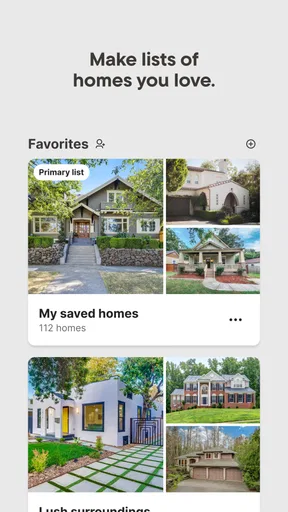

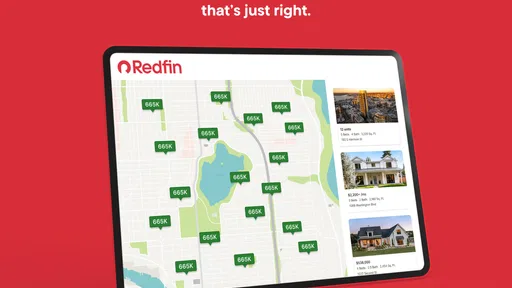
Our Review of Redfin: Buy, Sell & Rent Homes
 Analysis by Appyee
When I first opened Redfin: Buy, Sell & Rent Homes, the appeal was obvious: I could browse places for sale and rent without turning the search into a project. It is a free home-search app from Redfin, and I found its map-led approach useful for getting an early feel for a neighborhood as well as a property. The initial excitement is easy to understand; the more important question is whether it stays useful once the novelty of browsing fades.
A quick start, with a purpose beyond daydreaming
Redfin is aimed at people making practical housing decisions, but it also works for anyone keeping an eye on local listings before they are ready to move. Its House & Home focus is clear from the first search: put in a place, narrow the options, and compare what appears. The app is rated 4.7 on average, with around 162,000 ratings, and has been installed over 10 million times. Those figures suggest a widely used tool, though they do not tell me whether a particular listing suits your plans.
My best advice for the first session is to decide what you are trying to learn before you start scrolling. Are you checking what your budget might buy, comparing rentals near work, or looking for a home with a particular layout? A broad search can be entertaining, but it also produces a stream of properties that are hard to compare. Starting with a location and a few meaningful filters makes the results more useful and the app less likely to become a window-shopping habit.
Making the map work harder
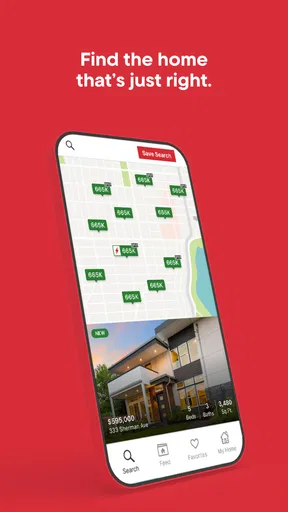
The map is more than a different way to look at the same list. It helps me notice how a home fits into its surroundings: whether several candidates cluster around one area, how far apart they are, and which location deserves a closer look. I would use it to shortlist a few neighborhoods before worrying about individual homes. That order matters, because a polished listing can distract from the daily route, nearby amenities, or the simple fact that the area is not where you want to live.
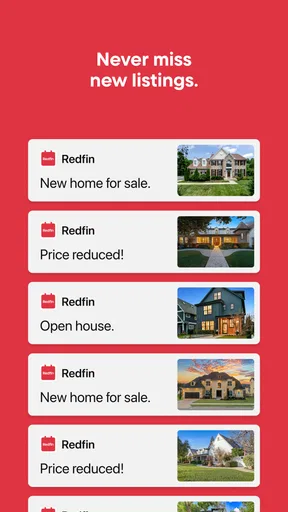
One practical workflow is to keep the search criteria stable while comparing locations, then change one condition at a time. If I raise the price ceiling, for instance, I can see what that trade-off adds; if I change the area instead, I can judge whether location is doing more for me than extra space. Alerts can help keep a focused search alive between sessions, but I would make them specific enough to be useful. Too many broad alerts risk turning a helpful reminder into background noise.
The app describes its listings as updating every five minutes. That can be valuable when I am actively searching, but I still treat any app listing as a starting point for follow-up rather than a promise that a home is available or that its details answer every question. A quick status check before rearranging a day around a visit is sensible, especially when a property has caught my attention.
Reading a listing without getting carried away
A listing combines photographs with details such as property history, tax information, and school ratings. I like having those points in one place because they help me move from “this looks nice” to “what should I verify?” The photos show how a home is presented, not necessarily how its rooms will feel in person, so I would use them to rule options in or out rather than make a final decision from the screen.
There is also a useful way to compare two homes that look equally appealing: write down the few facts that would actually change your decision, then check each listing for them. It might be the property’s history, a tax detail, or the location on the map. Keeping that short comparison in mind prevents a long scroll through attractive images from substituting for careful evaluation. The app offers a lot to inspect, but the important work is deciding which details matter to you.
School ratings can be a convenient point of reference for someone who considers them relevant, but I would not use a rating as a complete judgment of a school or neighborhood. Likewise, property history and tax details help frame questions; they are not a replacement for checking the particulars that matter to your finances and plans. Redfin is strongest as a browsing and comparison tool, not as a reason to skip independent due diligence.
Turning interest into a next step
The option to schedule a tour through the app makes the transition from browsing to seeing a property more direct. In a realistic weekday scenario, I might scan rentals or homes during a lunch break, narrow the list to a couple of plausible choices, and then look for a tour time that fits around work. That is more useful than saving dozens of listings without deciding what to do next. I would still check the arrangement and the property’s current status before treating a selected time as settled.
For a renter, the same basic process can help compare locations and available options without mixing every possibility into one mental shortlist. For a buyer, it can make early exploration less scattered. If you are only curious about the market, there is no need to turn every interesting listing into an appointment; the map and listing details can serve as a lightweight way to learn what different areas offer.
Where it fits among other ways to search
Compared with a general classified-listings app, Redfin feels more oriented toward structured property browsing: filters, a map, and listing information support a more deliberate search. Compared with checking an agent’s site or contacting someone directly, it is convenient for discovering candidates and arranging a tour, but an app cannot replace a conversation when your situation involves specific questions or a complicated transaction. I would use Redfin to build and refine a shortlist, then turn to the relevant people and documents before making a commitment.
That distinction matters if you are selling. The app includes tools for sellers, including listing-view tracking and buyer feedback, and the original appeal is the prospect of lower commission rates than traditional real estate services. Those points may make Redfin worth investigating if you are preparing to sell, but I would compare the actual service and terms available for your situation rather than assume an app feature alone determines the best choice. Someone who wants hands-on guidance throughout a sale may prefer to prioritize personal support over app-based visibility.
For budgeting, the mortgage calculator can help translate a rough price range into an estimated monthly payment. I treat that as an orientation tool, not a full household budget: affordability also depends on the expenses and circumstances that matter in your own case. It is most useful early on, when I am deciding whether to adjust the search range, rather than as a final answer about what I can safely spend.
Keeping the habit useful, not tiring
Redfin’s recurring value depends on having a reason to return. During an active move, alerts and changing listings can make short, purposeful check-ins worthwhile. If I am not moving soon, the market insights offer a way to follow local patterns, but I would set a clear limit on how often I check. Browsing every new possibility can create a sense of urgency without bringing me closer to a decision.
The main source of fatigue is not that the app asks me to learn a complicated system; it is that property searching naturally invites endless comparison. A large set of filters and detailed listings can help, yet they can also encourage me to keep changing the target instead of deciding what is non-negotiable. I get more lasting value by keeping a small shortlist, revisiting only meaningful changes, and letting an alert bring relevant options to me rather than restarting the search from scratch.
There are limits to what a phone-based search can settle. A map cannot tell me what a commute feels like at the time I would travel, and photographs cannot replace walking through a home. Listing details are useful prompts, but they do not remove the need to confirm important information directly. If you want a definitive valuation, legal guidance, or a highly personal assessment of a property, Redfin is not a substitute for the appropriate professional help.
The app is free and rated for Everyone, which makes it accessible to a broad audience. Redfin’s current version is 612.3 and it requires iOS 12 or later on Apple devices; on Android, I would check compatibility on the device’s app page before installing. It has been available since July 14, 2011, so this is an established product rather than a new listing experiment, though my recommendation still depends on whether its search style suits your needs.
Getting Started
First things first, downloading and setting up the app is a breeze. It's available on both Android and iOS, so you’re covered no matter your device preference. Once you've got it installed, you're greeted with a clean and intuitive interface. Honestly, the design is pretty slick. It’s straightforward and doesn’t bombard you with unnecessary info, which is a big plus in my book.
Exploring Properties
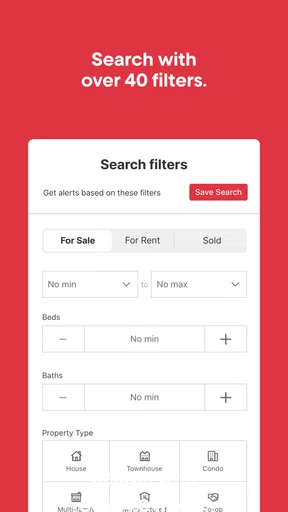
Now, let's dive into the core of the app — searching for properties. The search functionality is top-notch. You can filter results by location, price range, property type, and more. If you’re like me and love to dream big, you can even set alerts for specific criteria, so you never miss out on that perfect home.
What I really love is the interactive map feature. It’s super handy for visualizing where properties are located in relation to schools, parks, and other amenities. Plus, the app updates every five minutes, so you’re always looking at the latest listings.
Detailed Listings
Each property listing is packed with detail. You get high-quality photos, property history, tax details, even the school ratings in the area. There’s a lot of info to digest, but it’s presented in a way that’s easy to understand. I find myself getting lost in the details — in a good way!
The app also gives you the ability to schedule tours directly through the app, which is a fantastic feature. No more back-and-forth with realtors. Just pick a time that suits you, and you’re all set.
For Sellers
If selling is more your thing, Redfin has some neat features too. It offers a competitive advantage with its lower commission rates compared to traditional real estate services. You can track how many people have viewed your listing, and even see the feedback from potential buyers. This transparency is super helpful when trying to sell your home quickly.
Additional Features
One feature I didn’t expect but really appreciate is the mortgage calculator. This tool helps you estimate your monthly payments, giving you a realistic picture of what you can afford. It’s incredibly useful for budgeting and planning your finances.
The app also includes a section for market insights. You get a snapshot of the real estate trends in your area, which is crucial for making informed buying or selling decisions. Staying ahead of the market can be tricky, but these insights give you a leg up.
Final Thoughts
Overall, Redfin: Buy, Sell & Rent Homes is a fantastic tool for anyone involved in the real estate hunt. It’s user-friendly, packed with features, and genuinely makes the process of buying, selling, or even just browsing properties more enjoyable. Whether you’re a first-time buyer or a seasoned property veteran, this app has something to offer.
If you're ready to dive into the real estate market or simply want to keep an eye on trends, I highly recommend giving Redfin a try. It might just be the app that makes your property dreams a reality.
Who will get the most from it?
I would recommend Redfin most to people with a live search or a concrete reason to monitor one area: renters weighing locations, buyers trying to set a realistic price range, and sellers who want to follow activity around a listing. It is also handy for someone who is relocating and needs to compare several neighborhoods before arranging visits. If you are not planning a move and tend to find property browsing stressful, a general search app may not deserve a permanent place on your home screen.
For an active search, the useful habit is a short review at a time that already fits your routine. I might check alerts after work, remove listings that clearly miss my needs, and keep only a few candidates for a closer look. That keeps the app’s stream of new options connected to a decision rather than letting it become another feed to refresh.
A few sensible checks before committing
Before setting an alert, I would think about which criteria are genuinely fixed and which are flexible. Location and an affordable range may be firm, while a preferred feature could be negotiable. This small distinction helps prevent an over-narrow search from hiding reasonable alternatives, while avoiding broad alerts that send too many irrelevant results. If an alert becomes noisy, tightening or revising the criteria is better than ignoring all of them.
When comparing homes, I would also separate facts the app helps me inspect from questions that require direct confirmation. A tax detail or property history can guide follow-up, but I would verify important figures and conditions through the appropriate source before making an offer or signing anything. For tours, I would use the app to move quickly from interest to a possible visit, then confirm the arrangements rather than assuming that a displayed option settles every practical detail.
So, does Redfin earn lasting space? For me, yes during a move, because its map, filters, listing details, alerts, and tour scheduling support different stages of the same search. When a move is only a distant possibility, its value is less compelling; occasional market checks may be enough, and there is no reason to keep up with every listing. Redfin is best as a practical search companion, not a substitute for seeing a home, checking its facts, or getting personal advice when the stakes call for it.
Privacy and Permissions
See what permissions an app requests and how it handles your data.
- Identity
- find accounts on the device
- Contacts
- find accounts on the device
- Location
- approximate location (network-based), precise location (GPS and network-based)
- Photos/Media/Files
- read the contents of your USB storage, modify or delete the contents of your USB storage
- Storage
- read the contents of your USB storage, modify or delete the contents of your USB storage
- Camera
- take pictures and videos
- Wi-Fi connection information
- view Wi-Fi connections
- Other
- view network connections, full network access, run at startup, control vibration, prevent device from sleeping, read Google service configuration
Verdict
Strengths of Redfin: Buy, Sell & Rent Homes
- Intuitive user interface for easy navigation.
- Detailed property listings with high-quality photos.
- Real-time updates on new listings and price changes.
- Customizable search filters for precise results.
- Integrated mortgage calculator for budgeting.
Limitations of Redfin: Buy, Sell & Rent Homes
- Limited offline functionality for remote areas.
- Occasional inaccuracies in property availability.
- Push notifications can be overwhelming.
- Some features require account sign-up.
- Limited rental listings compared to buying.
Similar Picks in This Category
View All
Universal TV Remote Control
CodeMatics Media Solutions3.9

AlfredCamera Home Security app
Alfred Systems Inc.4.7

Planner 5D: AI Home Design
Planner 5D4.5

Universal Tv Remote-Cast to TV
One Music Player4.1

Zillow: Homes for Sale & Rent
Zillow Group4.8

99acres Buy/Rent/Sell Property
infoedge.com4.3
Frequently Asked Questions
What features does the Redfin app offer for home buyers?
The Redfin app provides a comprehensive suite of tools for home buyers, including access to the latest property listings, detailed home information, and virtual tours. The app also offers personalized recommendations, notifications for new listings, and the ability to schedule home tours with Redfin agents directly through the app.
How does Redfin assist sellers in listing their homes?
Redfin offers a user-friendly platform for sellers to list their homes quickly and efficiently. Sellers can work with Redfin agents to determine a competitive price, receive professional photos, and utilize strategic marketing tools. The app provides real-time updates and insights into the selling process, ensuring sellers are informed every step of the way.
Can I use the Redfin app to find rental properties?
Yes, the Redfin app includes a robust search feature for rental properties. Users can filter searches based on location, price range, and property type. The app provides detailed rental listings with photos, descriptions, and contact information for landlords or property managers, making it easy to find the perfect rental.
How does Redfin ensure the accuracy of its property listings?
Redfin updates its property listings every 5 minutes, pulling data directly from local Multiple Listing Services (MLS). This frequent updating ensures users have access to the most current and accurate information available. Additionally, Redfin agents verify listings to provide reliable data and insights to users.
What are the benefits of using Redfin agents compared to traditional agents?
Redfin agents are salaried, prioritizing customer satisfaction over commission. This model often results in significant savings for clients. Redfin agents use advanced technology to provide better service and can offer up-to-the-minute market insights. Their transparent, customer-focused approach differentiates them from traditional real estate agents.
